Stop hitting
refresh.
WatchTab reloads your Safari tabs on your schedule and tells you when the page changes. Stocks, tickets, restocks — let the tab do the waiting.
Watching a pageWATCHTAB — CORE CONCEPT
is not your job.
From 5 seconds to 24 hours.
Your rhythm.
Pages that move by the second, and pages you check once a day. Give each tab its own rhythm and let auto-reload keep time for you.
- Presets from 5 seconds, or any custom value down to the second
- Randomize the interval ±30% to slip past bot detection
- Restores your scroll position after every reload
- Settings save per URL and restore automatically

Only hear about it
when something changes.PREMIUM
No need to eyeball every reload. WatchTab spots the change for you — and shows you exactly what moved.
- Detects changes across the whole page, tuned to the site type
- Or pick a single element with one click — no CSS needed
- Highlights exactly what changed, right on the page
- Alerts you with a notification and an icon badge
Notifications are macOS-only. On iOS / iPadOS you get auto-reload and the countdown overlay.

Rests quietly
while you look away.
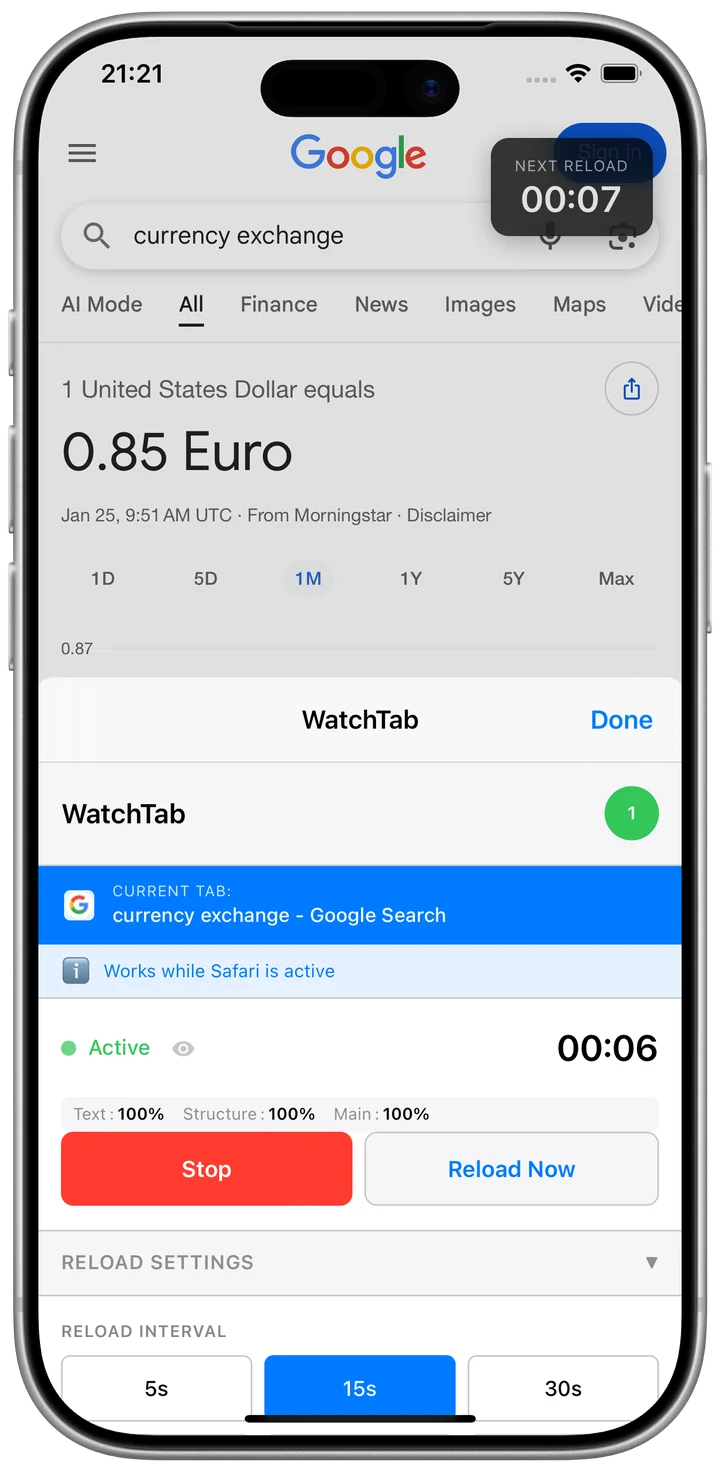
All you see is a small countdown in the corner. Idle tabs quietly stand down, and your data never leaves the device.
- Auto-pauses inactive tabs to save battery
- Position, size, and opacity of the countdown are all yours
- Everything stays on your device — there's no server to send it to

On the Mac's big screen,
or beside your iPad work.
In iPad Split View, keep an eye on a watched page while you work right beside it. On macOS, the watch keeps going even after you close Safari.

macOS
Auto-reload and monitoring keep running in the background even after you close Safari, change notifications included. macOS 13.3 or later.
iOS / iPadOS
Runs while Safari is on screen and resumes automatically when you come back. Pairs beautifully with iPad Split View. iOS 16.4 or later.
Every page you keep refreshing
is a job for WatchTab.
If you find yourself refreshing it just to check, WatchTab can take it from here.
"I can't look away from the opening bell."
Auto-refresh stock, forex, and crypto charts on a tight interval so you never miss a sudden move.
15 sec · Full page"Resales drop without warning, so I can't step away."
Watch a ticket's availability with a picked element and get a notification the moment it changes.
30 sec · Element + alert"The moment it says 'In stock' is the whole game."
Pinpoint just the stock label with the Element Picker and catch the restock first.
1 min · Element"That dashboard's always up on a screen — I'm done refreshing it by hand."
Reload dashboards and monitoring screens on a schedule so they're always current.
5 min · Full page"Auctions are won in the last five minutes."
Refresh the current bid by the second, and pause smartly while you're on another tab.
5 sec · Smart pause"Just tell me when something actually happens."
Detect and highlight new posts on news sites and forums, so you check in far less often.
10 min · Change highlightAuto-reload is free. Forever.
When you're ready to hand over the watching too, the Watch Plan costs less than a cup of coffee.
Free to download
- Auto-reload (5 seconds to 24 hours)
- Countdown overlay
- Auto-pause on inactive tabs
- Per-URL settings
- Reload statistics
or $5.99 /yr (about 2 months free)
- Everything in Free
- Content monitoring, full page or by element
- Highlighting of what changed
- Change notifications (macOS)
Prices shown are from the U.S. App Store.
Frequently asked questions
Is WatchTab free?
Auto-reload is free to use. Content monitoring — detecting page changes and notifying you — is a premium feature available through a subscription ($0.49/month or $5.99/year). Try the free auto-reload first.
Are there any differences between macOS and iOS / iPadOS?
The core features are the same, but the platforms differ. On macOS, auto-reload and monitoring keep running in the background even when Safari is closed. On iOS / iPadOS, WatchTab works only while Safari is in the foreground and resumes automatically when you return to it. Notifications are macOS-only.
How do I choose what to monitor?
Two ways. In "Full Page" mode, WatchTab identifies the type of site — news, shopping, data, and so on — and picks the best detection method automatically. In "Element" mode, just click the element you want to watch with the Element Picker. No knowledge of CSS selectors required.
Can I use it on several tabs at once?
Yes. Each tab can have its own reload interval and monitoring settings. Because settings are saved per URL, opening the same site in another tab carries your configuration over automatically.
What happens when a change is found?
WatchTab lets you know with a browser notification and an icon badge (notifications are macOS-only). The changed area is highlighted on the page, and the notification tells you what changed — for example, "Text content has changed."
How often can it reload?
Anywhere from 5 seconds to 24 hours. Pick a preset or type in a custom value. There's also a randomized-interval option (±30% of your setting) to help avoid bot detection.
Is my browsing data sent anywhere?
No. WatchTab collects no personal information. All of your settings and history stay on your device and are never sent to any external server.
Let the tab do
the waiting.
Free to download. Auto-reload is free forever.